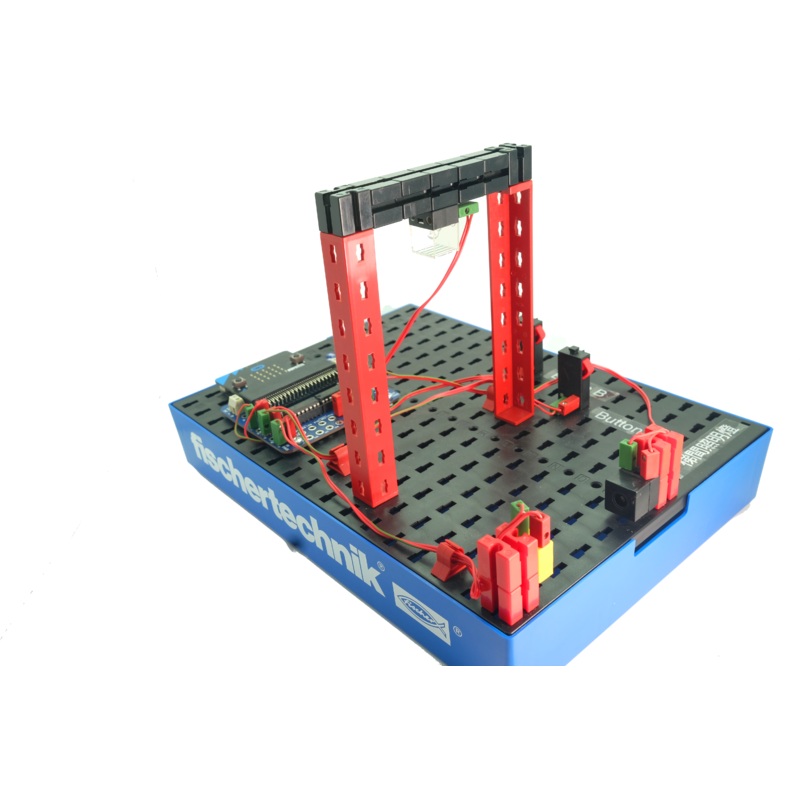
Do you know how to do that too?
You turn the light on in the staircase and aftera certain time it turns itself off. Or it turns onautomatically as soon as you enter the staircase.
How does that work?
A small box, which is normally installed in the main current distribution for the building, insures that the staircase lighting can be turned on on every floor. After a time, which can be set, the light is then turned off automatically.
Task 1
As soon as one of the two push-button switches is pressed, the staircase lighting is to be turned on. After 10 seconds, it is to go out automatically.
Task 2
The staircase lighting is to be able to be turned on both with the push-button switchesas well as by a light barrier.
Task 3
As soon as one of the two push-button switches is pressed, the staircase lighting is tobe turned on. If one of the push-button switches is pressed again, the light goes out.
Seeonline guide withmicro:bit coding samplesfor theStaircase Lightmodel.
Seemicro:bit coding with input and output guides here.
This is a specially discounted package -delivered in a clear plastic bag.
Each pack comes with thebonus fischertechik storage base (box 250 x 186)
I/O board for micro:bit
micro:bit pins extension board, designed specially to take advantage of fischertechnik’s unique, flexiblered and green round plugcable connections. By design, the I/O board rubber legsslotinto the fischertechnik black base-plate grid securely.
The price below is for 1 model out of the 12 models STEM II pack. If you want to build all 12 models, order the full STEMII packinstead.
The fischertechik advantage
- All model parts can be reused and recycled for other projects and student’s creative pieces. fischertechnik is made in Germany with quality and precision.
- No soldering. Ideal for all ages, promote problem solving, changes on the fly as debugging and adjustment can be done instantly. All works can be done to perfection as even the smallest adjustment can be accommodated, thanks to the complete range of mechanical/structural and electronic blocks offered by fischertechnik.
- One of the 12 models of STEM 2. You can now order it on its own for easy whole class lesson, without needing to pick and sort building blocks every time.
micro:bit code
Part 1 – micro:bit block commands used in theStaircase LightModel
To achieve fluency and competency in micro:bit coding, you really need to get a thorough understanding of each of the blockcatagories to be used in theStaircase LightModel (see part 2 below for the full code). Fortunately, all the reference guidesare available on the BBC micro:bit web site for you to get a deeper and more comprehensive understanding and mastery.
Through every fischertechnik STEM II models (12 of them), you can learn, practise, build fluency and confidence in coding.
The Staircase Light Model used the following micro:bit blocks. You can click to lean more about each of the block catagories. The links bring you directly to the respective part of the BBC micro:bit reference document site, where live codes are included for you to understand, try, and download:
- Basic(basic micro:bit functions and actions): On Start, Show LED, Show icon,Pause
- Input (events and inputs from sensors): Button is Pressed
- Loops: While Loop(repeat code while aBooleanconditionis true)
- Logic: If (conditionally run code depending on whether aBooleancondition is true or false)
- Variables:Assignvariables
- Function:Definea function,Callinga function
- Pins(Control currents in Pins for analog/digital signals, servos, i2c,…): Digital Write Pin,Digital Read Pin
Part 2 The “live”StaircaseCode – Understand, Edit and Download
The following code has used all the mentioned blocks in Part 1 above.
Comments In English, click the ” ? ” on block to find out the comment (meaning) of the block code.
- If you read this page on a computer with wider screen size, you will be able to see the micro:bit simulator that is fully clickable.
- If you cannot see the code, such as on a mobile phone, please clickthis link instead.
- Click to open the code on the micro:bit website for further editing and modification.
- Click to download this code to your micro:bit for immediate use or to save on your computer.
Online guide
Seeonline guide withmicro:bit coding samplesfor theStaircase Lightmodel.
Seemicro:bit coding with input and output guides here.
I/O board
| Connector | No. | Description |
| Outputs | 8 |
8 x light/LED 4 x DC motor – 600mA per output |
| Inputs | 6 |
5 x analog/ digital 1 x digital – signal up to 5V |
| I2C | 1 | 1 x connector (SCL, SDA) |
| 5V | 1 |
1 x sensor power supply connection (6-9V power supply) |
| 3.3 V | 1 | 1 x sensor power supply connection |
| Battery | 1 | 1 x battery (6 – 9 V) min 4.5 V |
| Power Supply | 1 | 1 x universal power adaptor ( 6 – 9 V) min 4.5 v |
Reviews
There are no reviews yet.