From the brand
-
Camera Drones
-
Portable Power Station
-
Handheld & Action
-
Professional Handheld
-
Top Accessories
From the manufacturer
/** * Common event handler for click and keydown events. * @param {Event} event – The event object. * @param {Function} handleClickOrEnter – Function to handle click or Enter key events. * @param {Function} handleEsc – Function to handle Esc key events. */ // [TODO][AplusMantle-8064] Create common event handler util(key events, click events) in AplusModuleResources function handleClickAndKeyEvents(event, handleClickOrEnterOrSpace) { const ENTER_KEY_CODE = 13; const ESCAPE_KEY_CODE = 27; const SPACE_KEY_CODE = 32; const isClick = event.type === ‘click’; const isKeydown = event.type === ‘keydown’; const isEnter = isKeydown && event.keyCode === ENTER_KEY_CODE; const isSpace = isKeydown && event.keyCode === SPACE_KEY_CODE; const isEsc = isKeydown && event.keyCode === ESCAPE_KEY_CODE; if (isClick || isEnter || isSpace) { handleClickOrEnterOrSpace(); } else if (isEsc) { handleEsc(event); } } /** * Function to handle esc key event. * @param {Event} event – The event object. */ function handleEsc(event) { event.target.blur() // force remove focus }
DJI Avata | Born to Fly
{“clickstreamNexusMetricsConfig”:{“actionType”:”DISCOVERY”,”productId”:””,”eventOwner”:”vsemetrics_playercards”,”schemaId”:”clickstream.CustomerEvent.4″,”producerId”:”vsemetrics_playercards”,”eventType”:”IVEVideoView”},”clientPrefix”:”aplus-969″,”closedCaptionsConfig”:{“captionsOnTexts”:{“en”:”English (Automated)”},”captionsOffText”:”Captions off”,”languageToLabelTexts”:{“English”:”English”}},”sushiMetricsConfig”:{“isRobot”:false,”clientId”:”VSE-US”,”videoAsinList”:””,”weblabIds”:””,”eventSource”:”Player”,”sessionId”:”000-9452754-0478418″,”refMarkers”:”aplus-969_ref”,”placementContext”:”AplusWidget”,”marketplaceId”:”ATVPDKIKX0DER”,”isInternal”:false,”endpoint”:”https://unagi-na.amazon.com/1/events/com.amazon.eel.vse.metrics.prod.events.test”,”requestId”:”9130F4B2995A492AA546″,”customerId”:”0″,”sessionType”:1},”mimeType”:”video/mp4″,”nexusMetricsConfig”:{“isInternal”:false,”widgetMetricsSchemaId”:”vse.VSECardsEvents.8″,”clientId”:”VSE-US”,”videoAsinList”:””,”weblabIds”:””,”eventSource”:”Player”,”videoAsin”:”hero-video”,”producerId”:”vsemetrics_playercards”,”refMarkers”:”aplus-969_ref”,”placementContext”:”AplusWidget”,”playerTSMMetricsSchemaId”:”vse.VSECardsPlayerEvents.7″},”videoHeight”:0,”videoWidth”:0,”videoUrl”:”https://m.media-amazon.com/images/S/aplus-media/vc/2c426a2a-01fb-4342-9890-5585b6a2dab1.mp4″,”metricsEmissionMethod”:”nexus”,”imageUrl”:”https://m.media-amazon.com/images/S/aplus-media/vc/ea128700-daaf-48ce-b87e-29ea6c74fc67.__CR0,0,1464,600_PT0_SX1464_V1___.jpg”,”awaConfig”:{“useUpNextComponent”:false,”clickstreamNexusMetricsConfig”:{“actionType”:”DISCOVERY”,”productId”:””,”eventOwner”:”vsemetrics_playercards”,”schemaId”:”clickstream.CustomerEvent.4″,”producerId”:”vsemetrics_playercards”,”eventType”:”IVEVideoView”},”initialVideo”:”hero-video”,”shouldPreload”:true,”enableClickBasedAttribution”:false,”isChromelessPlayer”:false,”closedCaptionsConfig”:{“captionsOnTexts”:{“en”:”English (Automated)”},”captionsOffText”:”Captions off”,”languageToLabelTexts”:{“English”:”English”}},”showPlayerPlayButton”:false,”isVideoImmersivePlayer”:false,”metricsEmissionMethod”:”nexus”,”skipInitialFocus”:false,”playerSkin”:”none”,”disabledViewIds”:[“replayHint”],”includeEarnsComissionDisclosure”:false,”customerId”:”0″,”containerId”:”aplus-969-player-386d2222-ae6b-44b0-8f85-759a958ecdcf”,”requestMetadata”:{“marketplaceId”:”ATVPDKIKX0DER”,”clientId”:”VSE-US”,”method”:”AplusWidget”,”requestId”:”9130F4B2995A492AA546″,”pageAsin”:””,”sessionId”:”000-9452754-0478418″},”shouldLoop”:false,”shouldDisableControls”:false,”alwaysSetInitialVideo”:true,”showPlayerCloseButton”:false,”clientPrefix”:””,”useAutoplayFallback”:false,”sushiMetricsConfig”:{“isRobot”:false,”clientId”:”VSE-US”,”videoAsinList”:””,”weblabIds”:””,”eventSource”:”Player”,”sessionId”:”000-9452754-0478418″,”refMarkers”:”aplus-969_ref”,”placementContext”:”AplusWidget”,”marketplaceId”:”ATVPDKIKX0DER”,”isInternal”:false,”endpoint”:”https://unagi-na.amazon.com/1/events/com.amazon.eel.vse.metrics.prod.events.test”,”requestId”:”9130F4B2995A492AA546″,”customerId”:”0″,”sessionType”:1},”ospLinkCode”:””,”showPosterImage”:true,”languageCode”:”en”,”version”:””,”nexusMetricsConfig”:{“isInternal”:false,”widgetMetricsSchemaId”:”vse.VSECardsEvents.8″,”clientId”:”VSE-US”,”videoAsinList”:””,”weblabIds”:””,”eventSource”:”Player”,”videoAsin”:”hero-video”,”producerId”:”vsemetrics_playercards”,”refMarkers”:”aplus-969_ref”,”placementContext”:”AplusWidget”,”playerTSMMetricsSchemaId”:”vse.VSECardsPlayerEvents.7″},”shouldStartMuted”:false,”airyVersion”:”VideoJS”,”languagePreferenceStrings”:{},”enableInactiveFocus”:true,”isReactFactory”:false,”enableDelphiAttribution”:false,”includeReportWidget”:false,”shouldAutoplay”:false},”needPlayerFactory”:false,”isMobile”:false} (window.AmazonUIPageJS ? AmazonUIPageJS : P).load.js(‘https://images-na.ssl-images-amazon.com/images/I/51v6HuvLjJL.js?AUIClients/VSEPlayer’); (window.AmazonUIPageJS ? AmazonUIPageJS : P).load.js(‘https://images-na.ssl-images-amazon.com/images/I/21L2L4uKEUL._RC|01x4giTy+uL.js,01r9LpT6pbL.js,41DFDIBs9mL.js,11QfrzttlqL.js,91qahXPBdEL.js,01ELLYeIOkL.js_.js?AUIClients/Brila’);
What is the difference between DJI Avata Pro-View Combo (DJI RC Motion 2) and DJI Avata Explorer Combo?
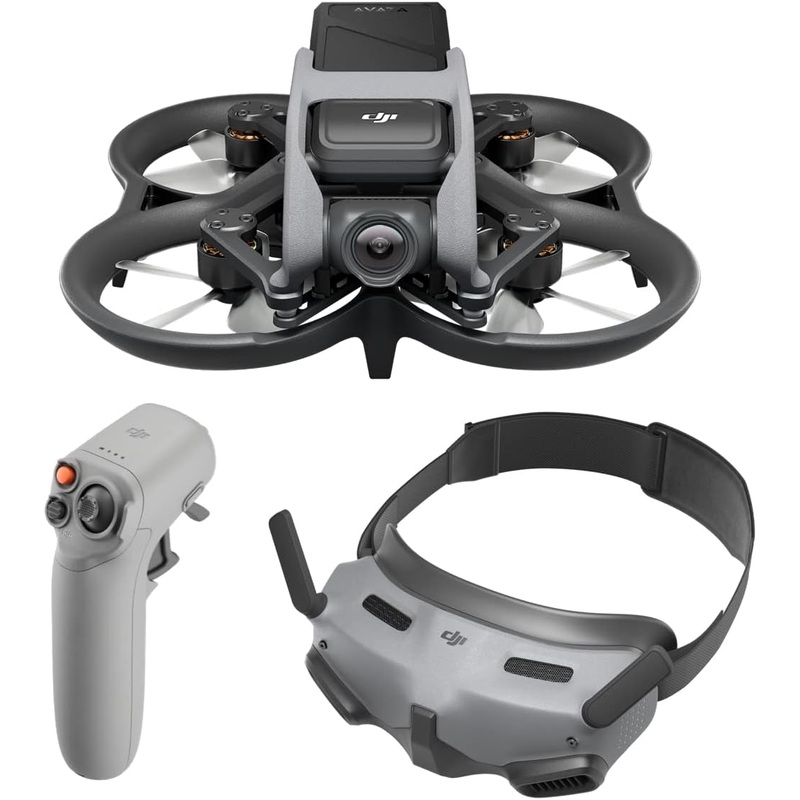
DJI Avata Pro-View Combo (DJI RC Motion 2): Includes Goggles 2 and RC Motion 2 for flexible control.
DJI Avata Explorer Combo: Includes Goggles Integra and RC Motion 2 for an integrated wearing experience.
What are the benefits of choosing DJI Avata for beginners?
1. The DJI Motion Controller offers easy control of the aircraft via motion actions
2. DJI Goggles 2 provide a crisp view in front of your eyes.
3. DJI Avata is compatible with the DJI Virtual Flight app so you can practice your skills.
What is DJI Motion Controller? Is it worth buying?
DJI Motion Controller supports one-handed operation, and can be used to achieve motion control of the aircraft. The intuitive and easy-to-use control mode allows even beginners to effortlessly operate the aircraft to perform difficult actions.
What is the difference between using DJI Avata with DJI RC Motion 2 and DJI FPV Remote Controller 2?
DJI RC Motion 2 can be operated by one hand and control the aircraft through intuitive hand motions.
DJI FPV Remote Controller 2 is suitable for users who are accustomed to the dual-stick control mode and want to achieve precise control.
Can I use DJI Avata without the goggles?
No.
Product Description
Overview
DJI Avata is available in the following five purchasing options:
DJI Avata Pro-View Combo (DJI RC Motion 2): Includes DJI Avata drone and related accessories as well as DJI Goggles 2 and DJI RC Motion 2, which provide flexible controls and rich functions for an immersive flight experience.
DJI Avata Explorer Combo: Includes DJI Avata drone and related accessories as well as DJI Goggles Integra and DJI RC Motion 2, allowing you to experience comfortable flight with the integrated wearing design.
DJI Avata Pro-View Combo: DJI Goggles 2 and DJI Motion Controller provide an immersive sensory experience with intuitive control by hand and head movements.
DJI Avata Fly Smart Combo: Includes DJI FPV Goggles V2 and DJI Motion Controller, making it a cost-effective choice for immersive flight experience.
DJI Avata: Includes DJI Avata drone and related accessories, you can purchase goggles and remote controller separately.
Notes
1. DJI Avata is compatible with DJI Goggles 2, DJI Goggles Integra, DJI FPV Goggles V2, DJI FPV Remote Controller 2, DJI Motion Controller 2, and DJI Motion Controller.
2. The 155 FOV is only available when the aspect ratio is 4:3, and the video recording specification is 2.7K@50/60fps or 1080p@50fps/60fps; the aspect ratio is 16:9, and the video recording specification is 4K@50/60fps, 2.7K@50/60fps, or 1080p@50/60fps.
3. HorizonSteady is only available in Normal mode FOV with an aspect ratio of 16:9 and the video recording specification of 4K@50/60fps, 2.7K@50/60fps, or 1080p@50/60fps. RockSteady is unavailable when the video recording specification is 2.7K@100/120fps or 1080p@100/120fps.
4. DJI Avata only supports downward obstacle sensing when used with DJI FPV Remote Controller 2 or DJI Motion Controller in N Mode or S Mode.
5. DJI Avata must maintain a distance of at least 0.25 m from the ground.”
Reviews
There are no reviews yet.