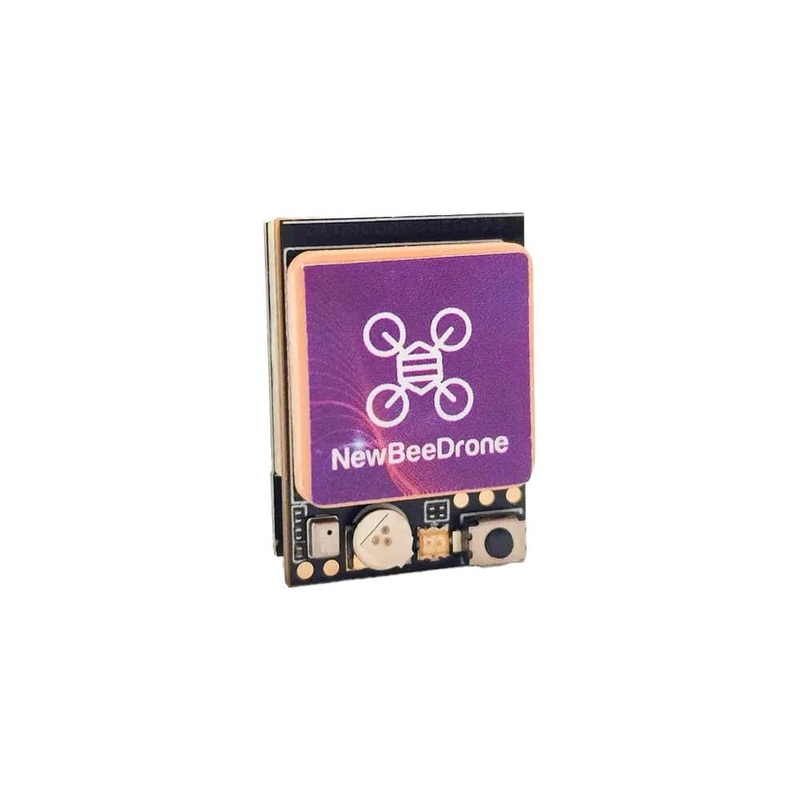
TheNewBeeDrone BeeID V1.1 M10Q GPS Module with Remote ID& Drone Tracker goes beyond compliance. It’s integrated Drone Tracker helps you locate and recover your downed drone using apps like Drone Scanner no extra hardware needed. With the advanced u-blox M10Q chipset and a high-gain ceramic antenna, the BeeID module locks satellites fast and delivers stable, accurate positioning perfect for GPS Rescue and autonomous navigation. Remote ID. GPS Accuracy. Drone Recovery. All-in-One.
Note: iNAV Users: Please disable the AUTO-CONFIG setting in iNAV to ensure proper functionality of the BeeID module.
Check out ourGPS selectionand the rest of our NewBeeDroneproducts.
Features
- Built-in Drone Tracker using BLE signal
- Supports smartphone-based search apps
- Designed for long-range and freestyle recovery situations
- Improves your chances of successful drone recovery
- Supports GPS / GLONASS / GALILEO
- 72-channel parallel tracking
- Fast lock times and accurate coordinates
- Works with Betaflight, iNAV, Ardupilot, PX4
- High-precision u-blox M10Q GPS
- Built-in Drone Tracker for signal-based drone recovery
- Remote ID compliant for FAA requirements
- Lightweight and compact (approx. 5.2g)
- Ceramic GPS antenna for strong reception
- WiFi setup via phone or PC
- Standard UART interface
- Built-in barometer for Remote ID altitude broadcasting
Specifications
- Dimensions: 22mm x 15.6mm x 8mm
- GPS Module: M10Q GPS for fast and precise location tracking
- Protocol: GPS L1. GLONASS L1. GALILEO E1.
- Weight:5.2g
- Antenna: Ceramic GPS Antenna
- Receiving Ch: 72ch
- Bitrate: 115200bps
- Speed Accuracy: 0.05m/s
- Dynamic Characteristics: 50,000 meters
- Operating Tempereture: -40C – +85C
- Connectivity: WiFi for configuration; BLE for RemoteID broadcasting
- Power: 5V input and ground connection
- Compatibility: Standard GPS UART output; works with Betaflight, iNAV, Ardupilot, and PX4
- Built-in Barometer: Provides altitude data for regions with altitude reporting requirements (The barometer does not participate in the flight, it is used solely for broadcast reports only.
BeeID M10Q GPS + Bluetooth Setup Instructions
Step 1: Verify Flight Controller Compatibility:Before installation, ensure that your flight controller (FC) and its firmware support the UBLOX GPS protocol.
- Some older versions of Betaflight firmware may not be compatible with UBLOX GPS.
- It is recommended to update your FC to the latest firmware to ensure proper functionality.
Step 2: Wiring the BeeID M10Q GPS Module:Proper wiring is essential for accurate data transmission between the BeeID module and your flight controller. Follow these steps:
- Connect the BeeID TX (Transmit) pin to the FC RX (Receive) pin on the same UART port.
- Connect the BeeID RX (Receive) pin to the FC TX (Transmit) pin on the same UART port.
- Ensure 5V power and ground are correctly connected to provide stable operation.
Step 3: Configuring the UART Port:After wiring, configure the corresponding UART port in your flight controller firmware:
- Set the baud rate to 115200bps to match the modules default speed.
- Enable GPS mode on the selected UART port.
- Save and reboot your flight controller to apply the changes.
Step 4: Confirm GPS Functionality:Verify that the module successfully acquires GPS satellites.
- In Betaflight, iNAV, or Ardupilot, check the GPS status page for satellite lock and position updates.
- Ensure that RemoteID broadcasting is active and functional via BLE. You can use the Drone Scanner App to check the broadcasting information.
Links
- BeeID 3D File
- Firmware– Please don’t update the firmware if you get the V1.1 version
- FAA UAS Declaration of Compliancehere
Includes
- 1x NewBeeDrone BeeID v1.1 M10Q GPS Module + Remote ID
Reviews
There are no reviews yet.