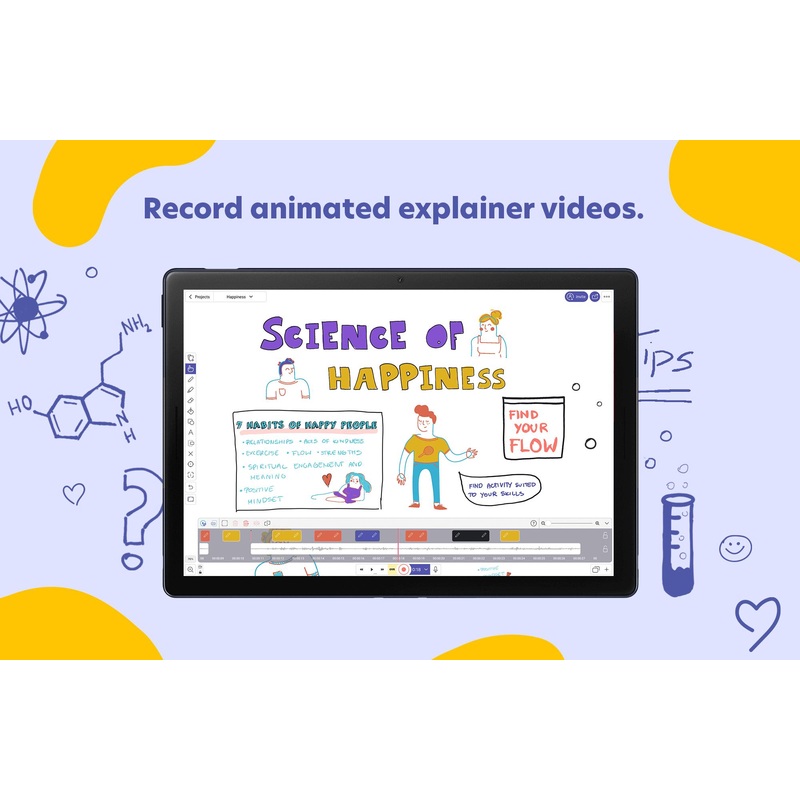
Combining the freedom of whiteboarding with recording, now comes with collaboration!
Your all-in-one tool that makes teaching better. Regardless if youre in the classroom or online, your draw board shouldnt limit the way you teach. Explain Everything excels where other whiteboards fail by empowering your instruction and enabling group work.
Record quick tutorials and video explanations
Wondering how to make a tutorial (explainer) video?
Presenting concepts and ideas has never been easier than it is when using an online whiteboard.
Import PDFs, demonstrate how to solve problems, do whiteboard drawings, highlight key concepts, and record the entire process so everyone can follow along. Export your video and share.Learn more
Collaborate with students and in groups
Have your students work on projects collaboratively, increasing their problem solving and teamwork skills no matter if youre in the classroom or still teaching remotely.
Creativity and productivity will help everyone learn faster.
Broadcast your classes with ease
Use your favourite video conferencing apps in tandem with Explain Everything Whiteboard to present your classroom projects to always stay on the same page with your audience.
No matter the distance.
Free Vs Paid Plan
Why get the paid plan?
The paid plan makes it possible to take full advantage of Explain Everythings capabilities.
Although the functionalities provided in the free and paid plan users are the same, there are features that make the paid plan stand out, such as expanded storage space, unlimited recording and number of projects and slides you can create, and customised group management.
| Explain Everything Freatures/Plans | Paid | Free |
| Number of Projects | Unlimited | 3 |
| Pages per Project | Unlimited | 1 |
| Recording length | Unlimited | 1 minute |
| Explain Drive Cloud Storage* | 1 GB/user* | 500 MB |
| Shared Folders | ||
| User and license management | ||
| MDM deployment | ||
| Advanced security & permissions |
* Paid plan can order additional Explain Drive storage to be shared amongst all users at the school
+ Student Licenses
How many licenses do I need for my school?
The number of licenses you might need depends on the teaching scenarios that are most applicable to your school. Take a look below to find out which use-cases suit you best.
| Use-case | license for Teachers | license for Students |
| Teachers create explainer videos for students to view (either from Explain Driver or an LMS). Learn more |
Required |
Optional |
| Teachers provide live instruction with the app. Students can work on assignments alone or in small groups together. Learn more |
Required | Required |
| Both teachers and students can create explainer videos. Learn more |
Required | Required |
| Both teachers and students actively collaborate within the app on a cloud project. Students can work on their own and download any number of projects. Learn more |
Required |
Required |
| Students do not create their own projects and only work live on projects provided by teachers. Students cannot work on projects in the absence of the teacher. Learn more |
Required | Optional |
Video Tutorials
Share the link to the video tutorial with your colleagues
https://www.etchkshop.com/collections/explain-everything
FAQ/Help
Visit the Explain Everything support site:
https://help.explaineverything.com/hc/en-us
Reviews
There are no reviews yet.